When Your Access Control System Creates More Work Than It Prevents
 Jay Hobdy
The most common access control problems in multifamily aren't dramatic failures. They're quiet friction points that show up in your daily routine — and most of them have straightforward fixes.
What access control problems do multifamily property managers deal with most? After working with apartment communities across Atlanta, the same issues come up consistently: credential management that never quite stays current, a credential technology gap that most managers aren't aware of, and a manager transition that reveals the wrong people have access — or nobody does. None of these are complicated problems. But they compound quickly when the systems underneath them aren't set up to handle them automatically.
1. Ghost Credentials — and Why Manual Deactivation Always Falls Behind
Ghost credentials — active fobs, cards, or PINs belonging to former residents, ex-employees, or expired vendors — are the most common access control problem we find at multifamily properties. They're not a reflection of careless management. They're a reflection of how manual the deactivation process is on most systems.
On older platforms like DoorKing, deactivation is entirely manual. There's no connection to your leasing data. When a resident moves out, someone has to log into the system, find the credential, and deactivate it. During high-turnover periods, that step gets missed. Multiply that across a 200-unit community with monthly move-outs and it adds up fast.
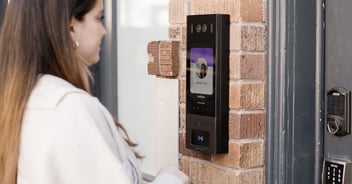
Modern platforms — Swiftlane, LiftMaster, and Accentra Multifamily — integrate directly with your property management software. When a lease expires, the resident's credential is automatically deactivated. No manual step, no lag time, no ghost credential left behind because move-out day was busy. For managers dealing with high turnover, that automation alone changes the daily workload meaningfully.
2. The Credential Cloning Problem — What's Actually Going On
If you've seen anything on social media about apartment key fobs being copied, the information is mostly accurate — and it's worth understanding what's actually happening.
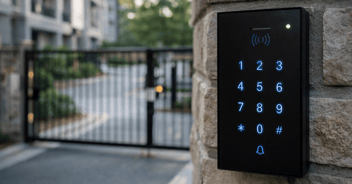
Most multifamily access control systems use 125kHz credential technology. It's the industry standard for a straightforward reason: it's cost-effective, especially during construction when budgets are tight. The tradeoff is that 125kHz credentials — standard proximity cards and fobs — can be copied using inexpensive readers available at retail locations.
Here's the part that most managers don't realize: collecting the credential and deactivating it isn't enough. Most communities recycle fobs and cards — the same credential gets reissued to the next resident. When a credential has been copied before it was returned, deactivating and reissuing it to the next resident doesn't deactivate the copy. The duplicate stays active. Both credentials work. The system can't tell them apart.
This creates two real problems. First, if an incident occurs — vandalism in the pool area, equipment damaged in the gym, something that prompts you to pull the access log and identify who was last through that door — the audit trail will point to whoever the credential was assigned to at the time. If a copy of that credential was used, you may be looking at the wrong person entirely, and you have no way to know it from the log alone.
Second, cloned credentials circulate. Current residents can duplicate their fob and hand copies to friends, family members, or anyone else they want to give access to community amenities. Pool, gym, parking — any access point that credential covers. The system logs it as a valid access event with no indication that an unauthorized copy is in use.
The more secure alternative is 13.56MHz technology. Higher frequency credentials use encrypted communication that is significantly harder to clone. The readers look identical from the outside. The security profile is meaningfully different. If your property is running 125kHz, you're not unusual — most properties are.
3. System Access Gaps During Manager Transitions
Manager transitions are one of the most consistent triggers for an access control problem — and it rarely surfaces until someone needs something they can't get to.
We see three versions of this regularly. The incoming manager has no access at all — credentials were never set up, and they're starting from scratch during a transition that's already chaotic. Or the entire staff has been sharing a single login, which means there's no reliable audit trail — every access event in the system looks the same regardless of who actually made it. Or a former manager or employee still has active access to the systems, and nobody caught it because nobody checked.
One note specific to DoorKing: if your team is managing the system through the DoorKing cloud portal, it's worth taking a close look at how admin users are set up and who currently has access. That's where we see shared credentials most often — and where former employees are most likely to still have active access without anyone having checked.
Any of these creates a real problem. No access means the manager can't do their job. Shared access means your documentation is unreliable when you need it most. And active access for someone who shouldn't have it is a liability exposure that's hard to explain after an incident.
The fix isn't a shared login — that makes the problem worse. The right fix is individual credentials for every user and a reliable process for setting them up and removing them when someone joins or leaves. Gotcha Security handles this as part of our standard onboarding and offboarding process. The incoming manager gets their own access to the systems they're responsible for before the outgoing manager's is removed. Every access event stays tied to the right individual, and the audit trail stays intact through the transition.
One More Thing Worth Knowing — Upgrades Don't Mean Starting Over
Two upgrade conversations come up regularly and both are simpler than most managers expect.
If credential security is a concern and you want to move from 125kHz to 13.56MHz, that's a reader swap — not a full system replacement. The controllers, wiring, and door hardware already in place stay exactly where they are.
If the access control system itself needs to be replaced — new platform, PMS integration, modern credential management — that's also not a gut job. In most cases it's the controllers that are replaced, not the readers, wiring, or door hardware. The infrastructure you already have goes further than most people assume.
Both conversations are worth having before writing off an upgrade as too disruptive or too expensive.
If any of this sounds familiar, we're glad to take a look at what you're working with. Gotcha Security works with community and regional managers across the Atlanta market on exactly these kinds of issues.
Download: Multifamily Security & Life Safety Inspection Checklist
Download: Gotcha Security Property System Record — document every system on your property, including platform names, who has access, and central monitoring details. Fill it out yourself or contact us and we will complete it for you.
Gotcha Security provides:
- Security Cameras & Video Surveillance
- Access Control Systems (Swiftlane, LiftMaster, Accentra Multifamily) & Vehicle Gates
- Burglar Alarm Systems & Monitoring
- Fire Alarm Monitoring
- Full Life Safety Inspections — fire sprinklers, extinguishers, emergency lighting, hydrants, backflow preventers & BDA/ERCES
Frequently Asked Questions
Why do ghost credentials keep building up on multifamily access control systems?
On most legacy platforms, credential deactivation is a manual process with no connection to leasing data. During high-turnover periods, that step gets missed. Modern platforms like Swiftlane, LiftMaster, and Accentra Multifamily integrate directly with property management software — when a lease expires, the credential is automatically deactivated without any manual step required.
What is the credential cloning problem in multifamily access control?
Most multifamily properties use 125kHz credentials, which can be copied using inexpensive equipment. The deeper issue is credential recycling — when a copied fob is deactivated and reissued to a new resident, the copy stays active. Both credentials work, and the system can't distinguish between them. Any access triggered by the copy logs under the reassigned resident's name, and current residents can duplicate credentials to give unauthorized access to amenities without any indication in the system.
What is the difference between 125kHz and 13.56MHz access credentials?
125kHz is the most common credential technology in multifamily access control — cost-effective and widely used, but copyable with inexpensive equipment. 13.56MHz credentials use encrypted communication that is significantly harder to clone. Upgrading to 13.56MHz is a reader swap — the controllers, wiring, and door hardware stay in place.
Does upgrading access control mean replacing the entire system?
Not necessarily — and usually not. Upgrading from 125kHz to 13.56MHz encrypted credentials is a reader swap — the controllers, wiring, and door hardware stay in place. Replacing the access control system itself — new platform, PMS integration, modern credential management — typically means replacing the controllers, not the readers, wiring, or door hardware. In most cases the existing infrastructure goes further than people expect.
What should a property manager do when a manager transition creates a system access gap?
Each manager should have their own individual credentials for the systems they're responsible for — not shared logins. When a transition happens, contacting Gotcha Security to set up the incoming manager and remove the outgoing manager's access keeps the audit trail intact and prevents the gap from happening in the first place.
Questions about your current access control setup? Call us at 678-430-3116 or visit gotchasecurity.net.
Gotcha Security | Atlanta, GA | Serving the Multifamily Market